Every android developer will face one day a need to create a custom dialog, where the user has to input some data for processing or any other purposes. This post is a short tutorial on how to create a custom dialog in android, dimming the background activity and asking user to input a string for a search query.
Custom dialog is implemented as another activity and treated as dialog by using special option in AndroidManifest.xml (listed at the end of this post).
The whole application consists of two activities (main + custom dialog), two small layout xml files and a modified AndroidManifest.xml.
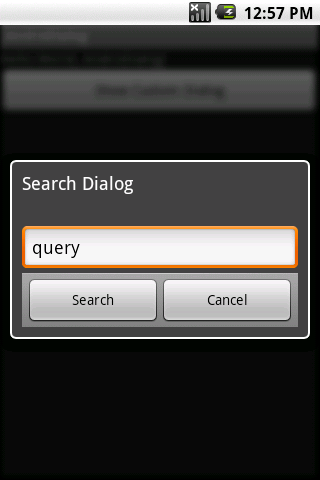
AndroDialog (main activity)
import android.app.Activity;
import android.content.Intent;
import android.os.Bundle;
import android.util.Log;
import android.view.View;
import android.view.View.OnClickListener;
import android.widget.Button;
public class AndroDialog extends Activity {
private Button startDialogBtn;
private static final int MY_CUSTOM_DIALOG = 0;
/** Called when the activity is first created. */
@Override
public void onCreate(Bundle savedInstanceState) {
super.onCreate(savedInstanceState);
setContentView(R.layout.main);
startDialogBtn = (Button)findViewById(R.id.startdialog);
startDialogBtn.setOnClickListener(new OnClickListener(){
public void onClick(View v) {
startCustomDialog();
}
});
}
/**
* Starts an Activity which in this case is a custom
* dialog, as specified in AndroidManifest.xml
*/
private void startCustomDialog() {
Intent intent = new Intent(this,SearchDialog.class);
startActivityForResult(intent, MY_CUSTOM_DIALOG);
}
@Override
public void onActivityResult(int requestCode, int resultCode, Intent data) {
super.onActivityResult(requestCode, resultCode, data);
switch(requestCode) {
case (MY_CUSTOM_DIALOG) : {
if (resultCode == Activity.RESULT_OK) {
Log.d("ANDRO_DIALOG","Coming back from the search dialog..");
String searchQuery = data.getStringExtra(SearchDialog.SEARCH_QUERY_RESULT_FROM_DIALOG);
Log.d("ANDRO_DIALOG", "Search query result: " + searchQuery);
}
break;
}
}
}
}
main.xml
<LinearLayout xmlns:android="http://schemas.android.com/apk/res/android"
android:orientation="vertical"
android:layout_width="fill_parent"
android:layout_height="fill_parent"
>
<TextView
android:layout_width="fill_parent"
android:layout_height="wrap_content"
android:text="@string/hello"
/>
<Button android:text="Show Custom Dialog"
android:id="@+id/startdialog"
android:layout_width="fill_parent"
android:layout_height="wrap_content">
</Button>
</LinearLayout>
SearchDialog.java (custom dialog activity)
import android.app.Activity;
import android.content.Intent;
import android.os.Bundle;
import android.view.View;
import android.view.View.OnClickListener;
import android.view.WindowManager;
import android.widget.Button;
import android.widget.EditText;
public class SearchDialog extends Activity{
public static final String SEARCH_QUERY_RESULT_FROM_DIALOG = "SEARCH_DIALOG";
private Button searchBtn;
private Button cancelBtn;
private EditText searchEdit;
@Override
public void onCreate(Bundle savedInstanceState) {
super.onCreate(savedInstanceState);
setContentView(R.layout.custom_dialog);
searchBtn = (Button)findViewById(R.id.search);
searchBtn.setOnClickListener(new OnClickListener(){
public void onClick(View v) {
returnSearchQuery();
}
});
cancelBtn = (Button)findViewById(R.id.cancel);
cancelBtn.setOnClickListener(new OnClickListener(){
public void onClick(View v) {
cancelDialog();
}
});
searchEdit = (EditText)findViewById(R.id.search_query);
searchEdit.setText("query");
getWindow().setFlags(WindowManager.LayoutParams.FLAG_BLUR_BEHIND,
WindowManager.LayoutParams.FLAG_BLUR_BEHIND);
}
private void returnSearchQuery(){
Intent resultIntent = new Intent(this, SearchDialog.class);
resultIntent.putExtra(SEARCH_QUERY_RESULT_FROM_DIALOG, searchEdit.getText().toString());
setResult(Activity.RESULT_OK, resultIntent);
finish();
}
private void cancelDialog(){
finish();
}
}
custom dialog xml layout
android:id="@+id/layout_root"
android:orientation="vertical"
android:layout_width="fill_parent"
android:layout_height="fill_parent"
android:padding="10dp">
<EditText android:id="@+id/search_query"
android:layout_width="fill_parent"
android:layout_height="wrap_content"/>
<LinearLayout android:orientation="horizontal"
android:background="@android:drawable/bottom_bar" android:paddingLeft="4.0dip"
android:paddingTop="5.0dip" android:paddingRight="4.0dip"
android:paddingBottom="1.0dip" android:layout_width="fill_parent"
android:layout_height="wrap_content">
<Button android:id="@+id/search" android:layout_width="0.0dip"
android:layout_height="fill_parent" android:text="Search"
android:layout_weight="1.0" />
<Button android:id="@+id/cancel" android:layout_width="0.0dip"
android:layout_height="fill_parent" android:text="Cancel"
android:layout_weight="1.0" />
</LinearLayout>
</LinearLayout>
AndroidManifest.xml
<manifest xmlns:android="http://schemas.android.com/apk/res/android"
package="com.softwarepassion"
android:versionCode="1"
android:versionName="1.0">
<application android:icon="@drawable/icon" android:label="@string/app_name">
<activity android:name=".AndroDialog"
android:label="@string/app_name">
<intent-filter>
<action android:name="android.intent.action.MAIN" />
<category android:name="android.intent.category.LAUNCHER" />
</intent-filter>
</activity>
<activity android:name="SearchDialog"
android:label="Search Dialog"
android:theme="@android:style/Theme.Dialog"/>
</application>
</manifest>
Hope this helps anyone needing to write a custom dialog for the android platform.